
An email address can look completely fine and still bounce the moment you hit send.
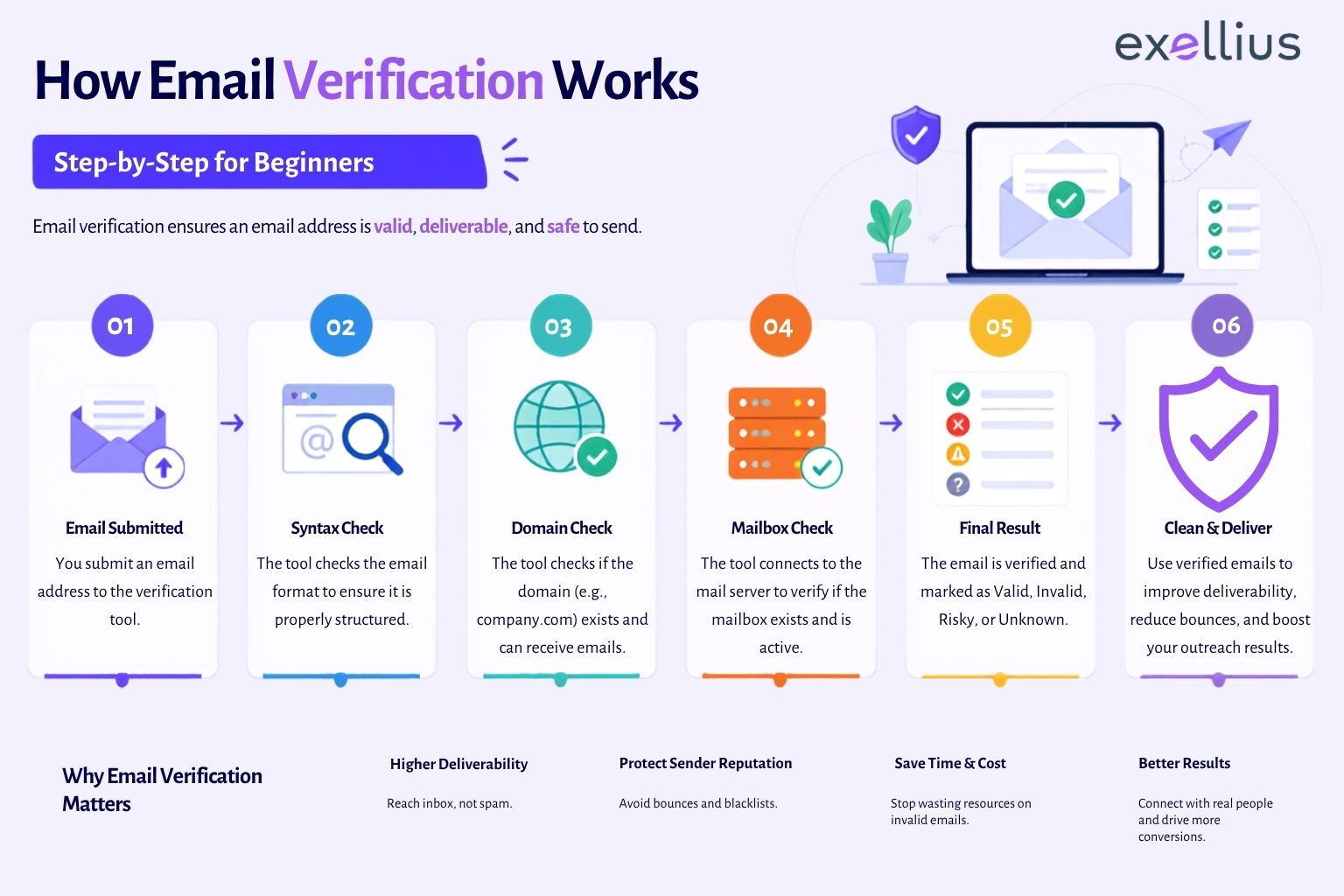
That’s because email verification isn’t really about how an address is written. It’s about checking whether the systems behind that address, the domain, the mail server, and the mailbox itself, are actually set up to receive mail. A verifier works through an address in stages: format, domain, mail routing, and finally the mailbox, before combining what it learns into one result, valid, invalid, risky, catch-all, or unknown.
Take jane.doe@acmecorp.com. There’s nothing unusual about it, the name’s there, the @ symbol is where it should be, and acmecorp.com reads like a normal company domain. But that only tells us the address looks right. Whether it actually works is a separate question, and answering it means checking the format, the domain, the mail systems behind it, and whatever the receiving server is willing to say about Jane’s mailbox specifically.
For a broader explanation of email verification, its purpose, benefits and best practices, read What Is Email Verification? Definition, Process & Best Practices (2026).
Key Takeaways
- Verification looks past how an address is written and checks the systems behind it, format, domain, mail routing, and the mailbox itself.
- A company’s domain can be perfectly healthy even when one employee’s mailbox isn’t.
- Most mailbox signals come from a short exchange between servers, not from an email actually landing in an inbox.
- Catch-all domains, greylisting, and rate limits produce genuinely uncertain results, that’s different from a failed check.
- Verification cuts down on avoidable bounces, but it can’t control what happens after you hit send.
How Email Verification Works
The email verification process follows several validation layers rather than relying on a single test.
How does email verification actually work: At a glance:
Email Address → Syntax and Format Validation → Domain and DNS Verification → MX Record Check → SMTP Connection → Mailbox Verification → Catch-All, Disposable and Role-Based Detection → Verification Status
1. Syntax and Format Check
First, the verifier just reads the address
Before it contacts anything, a verifier reads the address the way you or I would, no servers involved yet. jane.doe@acmecorp.com has the three things any address needs: a name, an @ symbol, and a domain, all in the right place. This is usually called a syntax check or format check, and it’s the fastest step because nothing has to leave the building.
Plenty of addresses get stopped right here:
- jane.doe@@acmecorp.com, two @ symbols
- @acmecorp.com, nothing before the @
- jane.doe@, no domain at all
- Addresses with stray or disallowed characters
None of this confirms that acmecorp.com is a real, working domain. It just confirms the address is legible.
To understand the different types of business data used in prospecting and enrichment, read What Is B2B Data? Definition, Types & Real Use Cases (2026).
2. Domain and DNS Check
Then it checks whether the domain is even real
This is where DNS comes in, think of it as the internet’s directory system. It’s what translates a name like acmecorp.com into the actual servers responsible for it. If a lookup for the domain comes back with something, the domain is live; if it doesn’t, there’s nothing behind the address at all.
Here’s why that distinction matters: jane.doe@company.invalid would sail through the format check without a hitch. It’s only once the verifier checks DNS that the problem shows up, .invalid is a domain ending set aside specifically for addresses that were never meant to resolve.
acmecorp.com, on the other hand, comes back clean. So the verifier moves on to figure out how mail actually gets delivered there.
Worth noting: this step is only as reliable as the data feeding into it. If you’re pulling addresses from CRM records or an enrichment tool, our guide to B2B data and its common use cases is a useful read on getting that upstream data right in the first place.
3. MX Record Check
Knowing the domain works isn’t the same as knowing where mail goes
A domain existing doesn’t automatically tell you where its email is handled, that’s a separate lookup, using something called an MX record. Think of MX records as the mail-routing entry for a domain: they point to the specific server responsible for handling incoming messages.
If DNS confirms acmecorp.com has an office, the MX record tells you which door the mail actually goes through. It’s still one step removed from Jane herself, it confirms the company has a working mail system, not that her particular mailbox is active. Some domains also run unconventional MX setups, so a missing or unusual record isn’t automatically a red flag. Verifiers tend to weigh it alongside everything else rather than treat it as a dealbreaker on its own.
4. SMTP and Mailbox Check
The part that actually gets close to Jane’s mailbox
This is where SMTP comes in, the protocol mail servers use to hand messages off to each other. The verifier opens a connection to acmecorp.com’s mail server, offers up Jane’s address, and reads whatever the server sends back before disconnecting.
For anyone curious about the mechanics: this exchange is known as RCPT TO in SMTP terms, and it stops there, before DATA, the stage where actual message content would be sent. That’s the mechanical reason verification doesn’t require sending anything at all.
Servers vary a lot in how much they’re willing to give away. Some will more or less confirm whether a mailbox exists. Others say very little on purpose, specifically to stop people from probing through addresses one by one. Outages and rate limits add another layer of noise, so this step doesn’t always end in a clean yes or no, and that’s fine. It’s part of how the system is designed to work.
5. Catch-All, Disposable, and Role-Based Detection
Why a “successful” response doesn’t always mean what you’d think
Even a good response from the mail server can be misleading, and catch-all domains are the clearest example of why. A catch-all setup accepts mail sent to almost any name at that domain, whether it’s real or not.
So if acmecorp.com happens to be configured this way, all of the following would get accepted:
jane.doe@acmecorp.com
sales@acmecorp.com
random12345@acmecorp.com
Notice that last one, nobody made that address up on purpose, and the server accepted it anyway. Once that happens, a “successful” response stops telling you much of anything, which is exactly why a verifier returns a Catch-All result instead of a false Valid.
Two other flags are worth knowing about. Disposable addresses are built for one-time or short-term use and tend to get flagged as risky. Role-based addresses, think info@ or support@, usually work just fine, but they’re not necessarily tied to the specific person you’re trying to reach.
What the result actually tells you
Once all the checks are done, the verifier returns a status. The same address, jane.doe@acmecorp.com, could land in any of these, depending entirely on what the domain and mail server reveal:
| Status | What it means | For Jane’s address |
| Valid | The main checks passed and the mailbox appears able to receive email. | Her domain and mail server respond, and the mailbox appears available. |
| Invalid | A critical check failed at the format, domain, or mailbox level. | acmecorp.com works, but the server indicates her mailbox doesn’t exist. |
| Risky | The address may work, but additional risk indicators were found. | It appears usable but carries another signal worth a second look. |
| Catch-All | The domain broadly accepts addresses, so the individual mailbox can’t be confirmed. | The server accepts her address and made-up addresses at the same domain. |
| Unknown | There isn’t enough information to classify the address reliably. | The mail server temporarily blocks the check or won’t reveal mailbox info. |
Some platforms go a step further and add a confidence score or a plain-language reason behind the result. That’s genuinely useful if your team wants to treat uncertain records differently rather than applying one blanket rule to everything that isn’t a clean Valid.
An Unknown result isn’t the verifier giving up
Say jane.doe@acmecorp.com clears format, domain, and MX without issue, and then the mailbox check just… stalls. That doesn’t mean the verifier failed at its job. It means there genuinely isn’t enough information to make a confident call.
More often than not, it comes down to greylisting, a “try again later” response some mail servers use as a basic spam filter, on the logic that legitimate senders will retry while spam infrastructure often won’t bother. Other times it’s a rate limit, a temporary outage, or a provider that simply keeps mailbox information private as a policy. A re-check a little later can sometimes clear things up.
Nobody can promise 100% accuracy, and that’s not really the point
Addresses don’t stay still. jane.doe@acmecorp.com can be active today and disabled next week if Jane leaves the company. Mail servers change behavior too, tighter security settings, an unexpected outage, a domain that flips to catch-all overnight. And then there’s everything that happens after verification that’s simply outside its control: sender reputation, authentication setup, spam filters, and whatever state the mailbox happens to be in the moment you actually hit send.
Verification filters out the obvious problems and flags real uncertainty honestly. It was never meant to be a delivery guarantee, just a much better starting point than guessing.
Catching bad addresses before they become a problem
Most bad addresses don’t look bad going in. Someone fills out a form with a typo, a sales rep adds a contact after a rushed call, a list gets imported from somewhere, and a broken address slips in quietly, sometimes sitting there for weeks before anyone notices.
Real-time verification moves the check earlier, right to the moment the form gets submitted or the CRM record gets created. Teams handling any real volume typically wire this up through an email verification API, so the check runs automatically as part of a signup flow, a lead pipeline, or a broader data process, rather than as a separate manual step.
It’s still worth rechecking older records every so often, too, contact data ages even when nothing about your process has changed.
Where Exellius fits in
The Exellius Advanced Email Verifier runs sales and marketing teams’ contact lists through this exact process, checking addresses and surfacing their status before those contacts ever make it into a CRM or an outreach sequence. If you need verification built directly into an existing app or workflow, the Developer API Hub handles that through API-based verification. And for anything more specific, a particular setting, an edge case, a workflow question, the Exellius Help Center has the detail.
If bounce rates are the reason you’re here in the first place, our guide to reducing bounce rates with verification goes deeper on that specific angle.
Also Read: How to Reduce Email Bounce Rate Using Email Verification
Frequently Asked Questions
1. Does verifying an email send a test message?
No. It’s done entirely through format, domain, and mail-server checks, no message ever actually reaches the inbox.
2. What’s an MX record check, exactly?
It finds which server handles incoming mail for a domain. For acmecorp.com, that’s the record pointing to wherever Jane’s mail actually gets delivered.
3.What does “catch-all” mean here?
The domain accepts mail addressed to almost any name, so a single “accepted” response from the server isn’t reliable on its own, it would accept a made-up address just as readily as a real one.
4. Why did my check come back Unknown?
Usually a temporary issue, greylisting, rate limiting, or a provider that keeps mailbox details private, rather than anything actually wrong with the address.
5. Can a Valid address still bounce later?
Yes. Verification reflects the moment it ran. If the mailbox gets disabled or the server has a bad day afterward, that’s outside what verification could have predicted.
Verify Email Addresses Before Adding to Your Workflow
Verification checks more than spelling. It checks whether there’s a real domain, a working mail system, and, as far as any server is willing to say, an actual mailbox sitting behind it. Sometimes the answer is clean and clear. Other times, Catch-All or Unknown is the most honest thing a verifier can tell you.
Run jane.doe@acmecorp.com, or any address on your list, through the Exellius Advanced Email Verifier before it goes anywhere near your outreach.
Leave a Reply