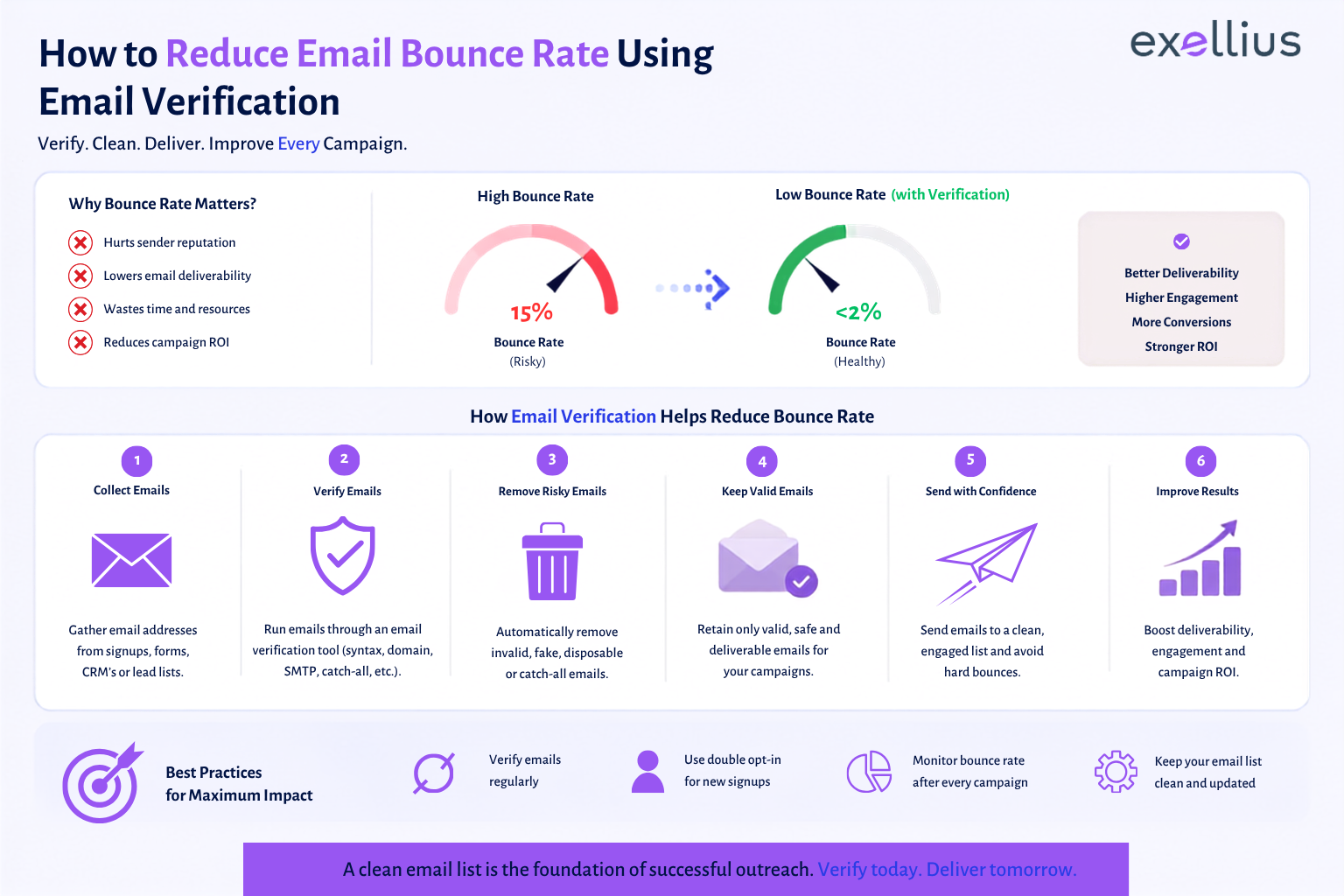

A high email bounce rate is usually a data-quality problem before it becomes a delivery problem. Invalid addresses, outdated contacts, misspelled domains, disposable addresses, and changing mailbox configurations can all push bounce rates higher.
The most reliable way to reduce email bounce rate is to control address quality before messages are sent, then continuously manage the addresses that enter your database. Email verification is central to that process, but it works best alongside list hygiene, bounce monitoring, suppression rules, and regular re-verification.
Key Takeaways
- Email verification is particularly effective at preventing hard bounces caused by invalid, non-existent, or undeliverable addresses.
- Soft bounces usually require a different response because the recipient address may still be valid.
- A clean list should be deduplicated, verified, segmented, and monitored over time.
- Catch-all and unknown results should be treated as risk categories rather than automatically classified as safe.
- Email data decays. A list that was clean several months ago may contain addresses that are no longer reliable.
What Is Email Bounce Rate?
Email bounce rate is the percentage of sent emails that could not be delivered to the intended recipients.
A simple email bounce rate formula is:
Bounce Rate = (Number of Bounced Emails ÷ Total Emails Sent) × 100
For example, if 100 emails are sent and five return as undeliverable, the bounce rate is 5%.
That number becomes more useful when you examine why those messages bounced. A campaign with several invalid addresses requires a different response from one experiencing temporary mailbox or server problems.
Google recommends reviewing bounceback messages and their error details to understand why individual messages failed.
Hard Bounce vs Soft Bounce
The distinction between hard bounce vs soft bounce is important because the corrective action is different.
| Type | What it means | Typical causes | What to do |
| Hard bounce | The message cannot be delivered permanently | Invalid email address, nonexistent domain, closed mailbox | Remove or suppress the address |
| Soft bounce | Delivery failed temporarily or because of a temporary recipient/server condition | Full inbox, server issue, temporary rejection, message-size limits | Monitor, retry where appropriate, investigate repeated failures |
A hard bounce is primarily an address-quality issue. A soft bounce is often a delivery-condition issue.
That distinction matters when trying to reduce email bounces. Removing every address that produces a temporary failure can unnecessarily shrink a healthy database, while repeatedly sending to permanent failures is worse for list quality and sender reputation.
Why Email Addresses Bounce
Email addresses become undeliverable for several reasons.
Some are obvious. A prospect may have entered name@compnay.com instead of name@company.com, creating an invalid email address. Others are less visible. An employee may leave a company and lose access to their mailbox, a domain may stop operating, or a mail administrator may change how the domain handles unknown recipients.
There are also addresses that look legitimate but should not be treated as fully safe for every campaign:
- Disposable email addresses can be created temporarily and may disappear quickly.
- Role-based email addresses such as info@, sales@, or support@ represent teams rather than individual recipients and may behave differently in an outreach program.
- Catch-all domains accept email for addresses that may not correspond to an active mailbox, making recipient-level verification less certain.
- Unknown email status can occur when the receiving server cannot be reliably checked at verification time.
These conditions make a static database unreliable over time. Hunter’s published verification research found that 5.5% of a previously verified sample had changed status over eight weeks, including addresses that became invalid or changed to accept-all.
How Email Verification Reduces Hard Bounces
Email verification addresses the problem before your campaign reaches the mail server.
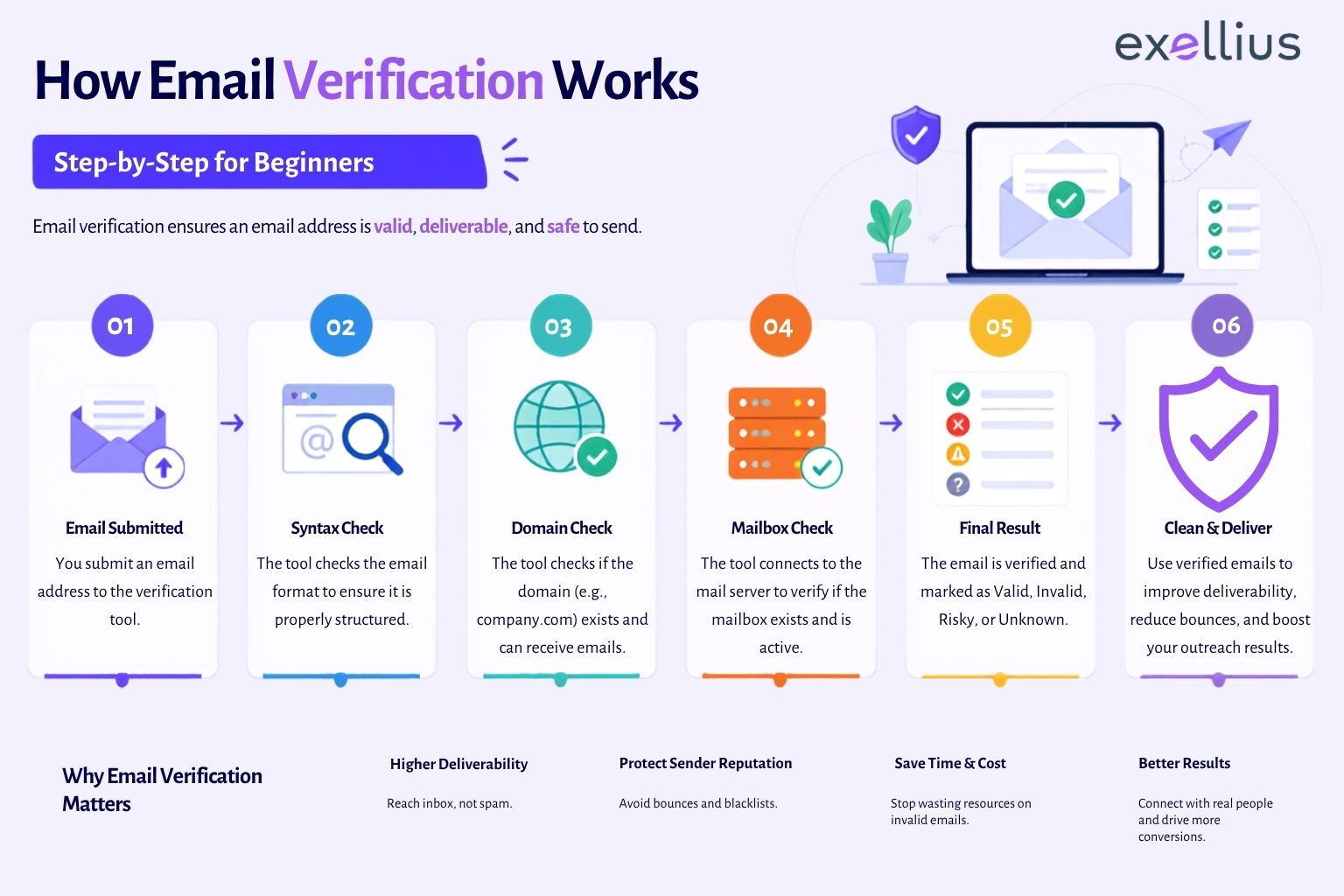
A modern verifier typically evaluates multiple signals, including address syntax, domain validity, DNS and MX records, and SMTP-level information. Exellius describes its verification process as including format checks, domain and MX validation, SMTP validation, disposable/webmail detection, and accept-all detection.
This helps separate an address list into actionable groups instead of treating every contact as equally deliverable.
The goal is not to promise that every verified address will reach the inbox. Verification reduces the risk of sending to addresses that are already invalid or clearly problematic. Temporary delivery failures, recipient-side restrictions, and changes that occur after verification still require ongoing monitoring.
A Step-by-Step Workflow to Reduce Email Bounce Rate
1. Clean and Deduplicate the List
Start with the database itself. Remove duplicate emails, obvious formatting errors, abandoned records, and contacts that should no longer receive communication. This is basic email list cleaning, but it is often where bounce prevention starts.
Suppose a sales team has 10,000 records. After a first review, it finds:
- 280 duplicate records
- 140 malformed addresses
- 210 contacts already marked as bounced
- 120 addresses belonging to former employees
The team now has a smaller but more usable list before verification even begins. This is why list hygiene should not be treated as a final marketing task. It belongs in the data-management process.
2. Verify Emails Before Sending
Next, verify the addresses that remain.
Use an email verifier to assess whether addresses are valid and whether their domains and mail servers can support delivery. For large lists, a bulk workflow is more practical than checking addresses individually.
Exellius’s Bulk Task supports bulk email verification for uploaded lists, while its Advanced Email Verifier provides multi-layer verification for individual or larger-scale workflows.
The important point is timing: verify emails before sending, especially when a list has been sitting in a CRM for an extended period.
3. Segment Valid, Risky and Unknown Results
Do not reduce the verification process to a simple yes/no decision.
A practical workflow separates:
Valid
Suitable for normal campaign use, subject to your usual sending and compliance controls.
Risky
Addresses such as catch-all, disposable, or role-based accounts that require additional judgment.
Unknown
Addresses that could not be conclusively evaluated because of server behavior or temporary verification limitations.
This approach is more useful than treating every uncertain result as either safe or invalid.
4. Suppress Repeated Bounces
Your email platform should not continue sending to addresses that repeatedly fail.
Hard-bounced addresses should normally enter a suppression list so they cannot accidentally return to an active campaign. Repeated soft bounces should also trigger investigation and, depending on the pattern, temporary suppression.
Keep the bounce reason whenever possible. Bounce codes and SMTP errors provide useful diagnostic information and can reveal whether the problem is an invalid mailbox, a temporary receiving-server issue, or another delivery condition. Gmail specifically recommends reviewing the error returned with a bounced message when diagnosing delivery failures.
5. Re-Verify Stale Records
Verification is not permanent.
People change jobs. Companies retire mailboxes. Domains change configuration. Lists also accumulate records through multiple systems, often without anyone checking whether the data remains current.
That is why a good process includes a re-verify email list step rather than relying on a single verification event.
Hunter’s research found measurable deterioration in a verified sample within weeks, reinforcing the need to consider verification close to campaign execution and to periodically review CRM data.
The right frequency depends on how quickly your data changes, where the data comes from, and how frequently you send. High-volume outbound teams and databases with frequent imports generally need tighter controls than stable, permission-based lists.
How to Handle Catch-All and Unknown Emails
Catch-all and unknown results need careful handling.
A catch-all domain can accept messages even when a specific mailbox does not exist. This makes it difficult for an external verifier to confirm the recipient with the same confidence as a standard mailbox.
An unknown result is different. It means the verifier could not establish a sufficiently reliable answer at that point. The receiving server may be temporarily unavailable, slow, restrictive, or configured to prevent verification attempts.
Neither status means “definitely invalid.” Neither should automatically mean “safe to send.”
For higher-risk campaigns, segment these addresses separately and apply your organization’s tolerance for delivery risk rather than mixing them with clearly verified contacts.
Common Bounce-Rate Mistakes
Buying or importing lists without verification
A large list is not automatically a valuable list. Imported records can contain outdated, duplicate, role-based, or invalid addresses.
Treating verification as a one-time exercise
A verified address can become invalid later. Data decay continues after the original check.
Ignoring form validation
Email quality should be controlled at collection. Basic form validation can prevent obvious syntax mistakes before they enter your CRM.
Skipping double opt-in where appropriate
For subscription-based programs, double opt-in adds another layer of confirmation that the address belongs to a person who intended to subscribe.
Continuing to mail hard bounces
This is an avoidable operational error. Once an address is confirmed as permanently undeliverable, it should not keep entering active campaigns.
Blaming every bounce on the contact list
Not every bounce is an address-quality problem. Soft bounces may stem from temporary server conditions, recipient storage limits, sending behavior, or other delivery constraints.
Email Bounce-Reduction Checklist
Before launching a campaign, check that you have:
- Removed duplicate emails and obvious formatting errors
- Verified newly collected addresses
- Reviewed invalid and risky verification results
- Segmented catch-all and unknown addresses
- Applied your suppression list
- Removed previous hard bounces
- Investigated recurring soft bounces
- Checked for stale records and recent CRM imports
- Re-verified older lists where data may have changed
- Confirmed your domain authentication and sending configuration
- Reviewed bounce codes and delivery errors after campaigns
Email verification handles only one part of deliverability. Google also recommends authenticated sending practices and responsible sending behavior, including SPF, DKIM, and DMARC, as part of its sender guidance.
FAQs
What causes a high email bounce rate?
Common causes include invalid or outdated addresses, nonexistent domains, full or unavailable recipient mailboxes, server-side rejection, stale email lists, and poor list hygiene. The first step is to separate permanent address failures from temporary delivery failures.
What is the difference between a hard and soft bounce?
A hard bounce is a permanent delivery failure, often caused by an invalid or nonexistent recipient address. A soft bounce is generally temporary, such as a full mailbox or temporary receiving-server problem. Hard bounces usually require removal or suppression, while soft bounces require monitoring and diagnosis.
How does email verification reduce bounces?
Email verification identifies addresses that are invalid, improperly formatted, associated with problematic domains, disposable, or otherwise risky before you send a campaign. This makes it one of the strongest controls for preventing address-related hard bounces.
Should I send to catch-all emails?
Not automatically. Catch-all domains make it difficult to confirm whether a particular mailbox exists. Treat them as a separate risk group and decide based on campaign value, sending volume, and your acceptable level of delivery risk.
How often should I clean my email list?
There is no universal schedule. Clean lists continuously as new records enter your systems, remove hard bounces promptly, and re-verify older records before important or high-volume campaigns. Evidence from email-verification testing shows that verified data can deteriorate within weeks, so long-unused lists should not be treated as permanently clean.
Read More
For the technical side of verification, see the Developer API Hub to integrate real-time verification into your workflows.
For broader data-quality use cases, explore the Data Enrichment Suite, which combines contact and company-data enrichment with verification workflows.
You can also read Exellius’s guide on reducing email bounce rate through lead verification for a deeper look at list-cleaning and verification practices.

Leave a Reply