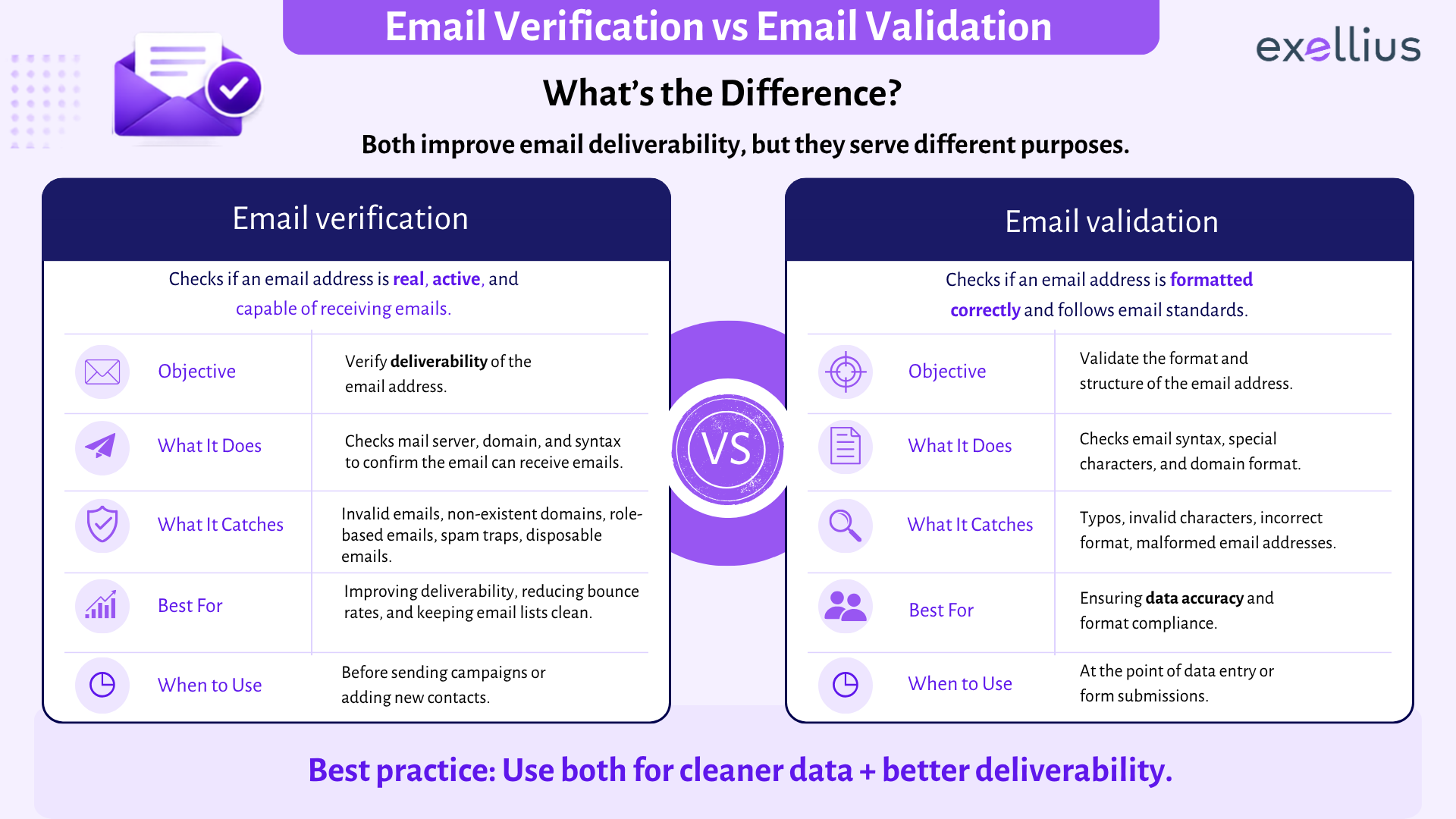

An email address can be perfectly well-formed and still fail when you send a message to it. That is the simplest way to understand the email verification vs email validation debate. Validation primarily asks whether an address follows the expected structure and rules. Verification goes further by checking the domain, mail-routing configuration, and, where technically possible, whether the receiving system appears able to accept mail for that mailbox.
The terminology is not perfectly consistent across vendors. Some tools use validation to describe a broader set of checks that includes mailbox detection, while others reserve verification for those deeper checks. The practical question is therefore not what a vendor calls its product, but what the product actually checks. Hunter makes the same distinction, describing validation as format and syntax checks and verification as deeper technical checks such as MX and SMTP.
Email validation checks whether an address looks structurally correct and plausible. Email verification checks more than that, including the domain, DNS or MX configuration, and available signals about mailbox existence.
For example: jane.doe@acme-example.com
A format check can determine that the address is written correctly. It cannot, by itself, tell you whether acme-example.com exists, whether the domain accepts email, or whether Jane has an active mailbox there.
That distinction is why validation is useful at the point of data entry, while verification is generally more useful before sending campaigns or importing large contact lists.
What Is Email Validation?
Email validation is the first layer of checking an address.
At its simplest, an email syntax validation process looks at the structure of the address: whether it contains the expected components, whether the @ is in the right place, and whether the characters and formatting are acceptable under the relevant email rules.
RFC 5322 defines the Internet Message Format, including the grammar used for addresses within email messages. But those syntax rules do not establish that a particular mailbox exists or that a recipient can actually receive mail.
A basic validation process can therefore catch problems such as:
- jane.doe@@company.com
- jane.doe@
- @company.com
- obvious spacing or formatting errors
- malformed domains
This is why an email format check is valuable on registration forms, lead forms, newsletter signups, and CRM data-entry workflows.
But a valid email format should not be mistaken for a valid recipient.
jane.doe@company-example.com can pass the syntax test even when the domain does not exist or the mailbox has never been created.
What Is Email Verification?
Email verification starts with validation and adds checks that examine the systems behind the address.
A typical verification process may assess:
- domain validity
- DNS configuration
- MX record availability
- SMTP responses
- mailbox existence signals
- disposable email addresses
- catch-all email behavior
- other risk indicators
Exellius describes its verifier as combining syntax and format checks with domain and MX checks, SMTP validation, disposable and webmail detection, and accept-all detection.
The deeper checks are possible because email delivery itself involves communication between mail systems. SMTP, defined by RFC 5321, includes commands such as RCPT TO that identify the intended recipient. In some cases, a receiving server can respond with information indicating whether a recipient is accepted; however, servers differ in what they reveal, and some do not perform recipient verification until later in the transaction.
That is also why good verification systems should return uncertainty when the evidence is inconclusive rather than pretending every address can be classified with certainty.
Email Verification vs Validation: Comparison Table
| Check | Email Validation | Email Verification |
| Syntax rules | Yes | Yes |
| Email format check | Yes | Yes |
| Domain validation | Sometimes basic | Yes |
| DNS check | Usually no | Commonly yes |
| MX record check | Usually no | Commonly yes |
| SMTP verification | No | Often yes |
| Mailbox existence | No | May assess available signals |
| Catch-all detection | No | Often yes |
| Disposable email detection | Optional | Common |
| Hard bounce prevention | Limited | Stronger |
| Best use | Data entry and form validation | Pre-send list checks and data hygiene |
The key distinction is depth. Validation tells you whether an address is structurally acceptable. Verification attempts to establish whether it is operationally usable.
Checks Performed at Each Stage
1. Syntax and Format
The system first checks whether the address is formatted correctly.
This is fast and useful, but it is only a structural test. It says nothing about whether a mailbox exists.
2. Domain and DNS
The next question is whether the domain is real and properly configured.
A DNS check can establish whether the domain resolves and provide information about the domain’s mail infrastructure. This prevents a common mistake: assuming that a correctly formatted address must belong to a working domain.
3. MX Record Check
An MX record check looks for the mail-exchange records that identify servers responsible for receiving email for a domain.
That still does not prove that an individual mailbox exists. A functioning company mail system can contain hundreds of valid and invalid addresses.
4. SMTP Verification
SMTP verification goes closer to the recipient level by communicating with the relevant mail server.
The receiving server may provide a response indicating whether a recipient is accepted. However, server policies vary, some deliberately conceal mailbox information, and some use configurations that make the result less definitive. RFC 5321 explicitly notes that recipient verification behavior varies between SMTP servers.
This is why verify email without sending does not mean there is a universal technical test that can guarantee mailbox existence. Verification works by collecting available signals without delivering a message to the recipient.
5. Risk Detection
A strong verifier also looks beyond simple mailbox responses.
A catch-all email domain may accept messages for addresses that do not correspond to individual mailboxes. A disposable email address may be technically functional but unsuitable for a long-term business relationship.
These are not necessarily syntax failures. They are data-quality and delivery-risk signals.
Two Practical Examples
Example 1: Validation passes, verification fails
Consider:
maria@brightstar-example.com
The structure is correct, so an email validation tool may return a positive result.
A deeper verification process then checks the domain and finds that it has no usable mail configuration.
Result: valid-looking address, but not a reliable recipient.
This is the clearest example of the difference between email verification and email validation: structure is not the same thing as deliverability.
Example 2: Validation and domain checks pass, but mailbox status remains uncertain
Now consider, maria@brightstar-example.com, the domain exists and has MX records. The receiving server responds, but it accepts almost any recipient under the domain.
The verifier identifies the domain as catch-all.
Result: the address cannot be confirmed with the same confidence as a normal mailbox.
Sending to such an address may still work, but the data should be treated differently from a clearly verified mailbox.
When Is Validation Enough?
Validation is often enough when your immediate problem is preventing bad data from entering a system.
For example, a signup form can reject: john@@company.com, before that record reaches your CRM.
That is a worthwhile control because it catches simple mistakes at the source. Form validation also reduces unnecessary cleanup later.
But form-level validation should not be expected to determine whether a business contact is still employed, whether a mailbox exists, or whether the recipient server will accept mail.
For those decisions, verification adds the missing layer.
When Is Full Verification Needed?
Full verification becomes more important when the cost of sending to bad addresses is meaningful. Typical cases include:
Outbound sales lists: Older prospect databases can contain abandoned or reassigned addresses.
Marketing databases: Contacts collected months or years ago may no longer be active.
Bulk uploads: Data imported from multiple sources often contains duplicates, outdated records, and inconsistent quality.
High-volume email programs: Even a relatively small percentage of invalid addresses can create a significant number of failed deliveries.
A dedicated Advanced Email Verifier can be used to assess addresses before they enter campaigns or other operational workflows.
For teams sourcing contact details rather than checking existing ones, a Professional Email Finder serves a different purpose: finding professional contact information, with verification built into the resulting data workflow.
Why Vendors Use the Terms Differently
This is where the terminology becomes confusing. There is no universal industry rule requiring every provider to use validation and verification in exactly the same way.
Hunter makes a useful distinction between the two, while Mailgun’s current Email Validation API includes syntax checks, DNS validation, spell checks, and mailbox detection. In other words, one provider’s “validation” can cover checks that another provider might describe as “verification.” That means buyers should evaluate the underlying process instead of selecting a product based on terminology.
Ask:
Does it only check syntax?
Does it perform domain and MX checks?
Does it use SMTP-level signals?
Can it identify catch-all or disposable addresses?
Does it return an unknown or risky status when evidence is inconclusive?
Those answers tell you considerably more than the product label.
Best-Practice Workflow
For most organizations, the strongest approach is not to choose validation or verification. Use both at different points in the data lifecycle.
- At collection: Use validation rules to block obvious formatting errors.
- During data processing: Run verification before valuable leads enter outbound campaigns or high-volume email programs.
- After verification: Separate valid, risky, catch-all, and unknown records rather than treating them as one group.
- Over time: Recheck older records because contact data changes.
- At scale: Integrate verification directly into the data pipeline instead of depending entirely on manual uploads. An Developer API Hub can support real-time email verification and programmatic data workflows.
For a deeper explanation of the technical verification process, read What Is Email Verification.
FAQs
Is email validation the same as email verification?
No. Validation generally focuses on whether an address follows the expected structure and rules. Verification goes further by evaluating the domain, mail infrastructure, and available mailbox-level signals. The terms are sometimes used interchangeably by vendors, so the checks included matter more than the label.
Does validation confirm that a mailbox exists?
No. A syntax or format check cannot prove that a specific mailbox exists. It can only establish that the address is structurally plausible.
What checks are included in email verification?
Depending on the provider, verification can include syntax, domain validation, DNS checks, MX record checks, SMTP verification, mailbox detection, catch-all detection, and disposable email identification.
Which process helps prevent hard bounces?
Verification is generally the stronger control because it goes beyond syntax and attempts to identify addresses that are not operationally usable. Validation alone can still allow correctly formatted but nonexistent addresses through.
Why do tools use validation and verification interchangeably?
The terminology is not standardized across commercial tools. Some providers use validation as a broad term that includes mailbox and DNS checks, while others distinguish validation from deeper verification. Evaluate the actual checks, result categories, and handling of uncertain addresses rather than relying on the product name.
The Practical Difference Matters More Than the Label
The easiest way to remember email verification vs email validation is this:
Validation asks, “Does this address look right?”
Verification asks, “Does the address appear capable of receiving email?”
That difference matters when email data feeds sales outreach, marketing campaigns, CRM systems, or other business processes. Syntax checks are an important first line of defense, but they are not proof that a mailbox exists.
A reliable data workflow uses validation to catch obvious errors early and verification to assess the addresses that actually matter before they are used.
Leave a Reply